

- Mark as New
- Bookmark
- Subscribe
- Subscribe to RSS Feed
- Permalink
- Report Inappropriate Content
12-22-2021 08:03 PM in
SupportHow ro remove the edge panel for navigation bar in samsung a51?
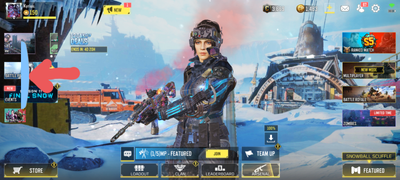
it is a nuisance for it keeps blocking my touch
- Tags:
- Galaxy A

- Mark as New
- Subscribe
- Subscribe to RSS Feed
- Permalink
12-22-2021 10:52 PM in
SupportHi! I'm Sam, your friendly Samsung Customer Service guy. Welcome to Samsung Members Community! Explore your new hub for all things Samsung and beyond. Earn the coolest badges and enjoy awesome perks from us by connecting with Samsung experts, super-fans, and other Community members for tips on features and how to get the most out of your Samsung product. Should you need technical assistance, don't hesitate to reach us via our TOLL-FREE mobile number #GALAXY (#425299) or via our TOLL-FREE LANDLINE: PLDT Toll free : 1-800-10-726-7864 Globe Toll Free : 1-800-8-726-7864 Standard Landline : (02)8-422-2111 Daily (8:00 AM to 8:00 PM) or via LIVE CHAT SUPPORT: https://livechat.support.samsung.com/Customer_new/PH
- To open up the menu, swipe left on the Edge panel handle; it's a gray tab on the right side of the screen.
- Then, tap the Settings icon (it looks like a gear).
- Select or deselect the edge panel you want to add or remove. You can select up to ten Edge panels.

- Mark as New
- Subscribe
- Subscribe to RSS Feed
- Permalink
- Report Inappropriate Content
12-23-2021 06:12 AM (Last edited 12-23-2021 06:12 AM ) in
SupportIf this works, please accept the solution and if not let me know and I'll try to help out as much as I can.


