

leahcim2023
Beginner Level 3
Options
- Mark as New
- Bookmark
- Subscribe
- Subscribe to RSS Feed
- Permalink
- Report Inappropriate Content
02-18-2024 10:10 AM in
Wearables
4 Comments

Joce1
Expert Level 1
Options
- Mark as New
- Subscribe
- Subscribe to RSS Feed
- Permalink
- Report Inappropriate Content
02-18-2024 11:20 AM in
Wearables
Swipe down and you will find always on display
leahcim2023
Beginner Level 3
Options
- Mark as New
- Subscribe
- Subscribe to RSS Feed
- Permalink
- Report Inappropriate Content
02-18-2024 11:44 AM in
Wearables
Yeah, I've done that, but I'm trying to set it up as a routine to turn itself on automatically. 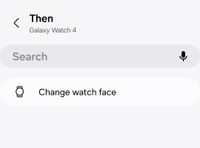

Al-001
Active Level 7
Options
- Mark as New
- Subscribe
- Subscribe to RSS Feed
- Permalink
- Report Inappropriate Content
02-18-2024 07:00 PM in
Wearables
I can't set up a routine of changing watch faces and turn on/off ALWAYS DIPLAY ON automatically on watch6 .

 Helenna
Moderator
Options
- Mark as New
- Subscribe
- Subscribe to RSS Feed
- Permalink
02-19-2024 10:04 AM in
WearablesHi, I request you to please take the help from the given link and check.
https://www.samsung.com/ca/support/mobile-devices/how-to-use-always-on-display/

